Builds, deployments, errors and latency in one view
The state of a release lives in four places: the pipeline, the error tracker, the dashboards and the issue board. Muxwall lets you put the one panel you care about from each next to the others, exactly as those tools draw it.
- Deployments
- Builds
- Issues
- Error rates
- Latency
How it fits the day
Release day
Pipeline runs, release health and the latency panel on one dashboard. When the error-volume graph bends, it is right beside the deployment that caused it.
No exporter to write
If a panel is on a compatible page of your tool, you can put it on your dashboard without building an integration: point at it and click.
The team’s wall
Share the dashboard with the team, or run it in Wall mode on the screen above the desks.
A sample board
Demo with sample data- API latencyInfrastructure monitor (sample site)
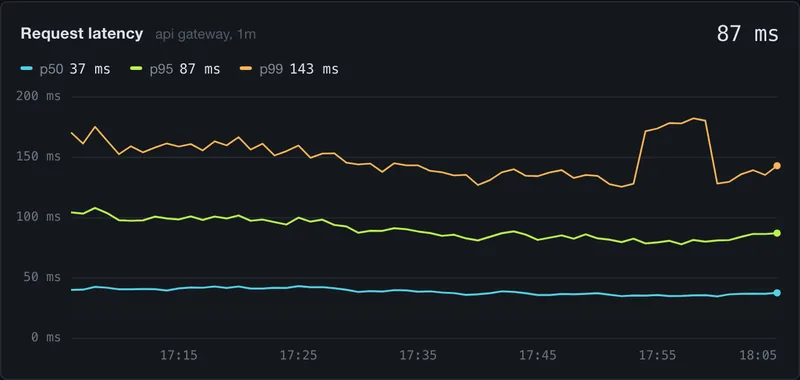
Updated 1 min ago
- Workflow runsGitHub
- api · deployOperational
- web · testOperational
- worker · buildFailed
Updated 2 min ago
- Unresolved issuesSentry
14
3 new today
Updated 4 min ago
Pictures are captures of Muxwall’s own sample sites; names and numbers are invented. In your dashboard, each tile is a capture of the source page, with its own last-update time.
Limits to know
- This is a view of your tools, not a replacement for their alerts: paging and on-call stay where they are.
- A panel has to be on screen in its page to be captured; a dashboard that scrolls needs the panel you picked in view.
What you need
- Chrome on a computer, or another Chromium-based browser such as Edge or Brave, with the extension installed. Tested so far in Chromium.
- A tile updates while its source page is open and visible in your browser (the active tab of a window that is not minimised), or when you click the extension on that page. Nothing updates with the browser closed.
- Automatic updates need a one-time permission you can withdraw (“Keep my tiles updated”). Without it, tiles update when you click the extension.
- Every tile shows when it was last updated, and is marked late, or as needing attention, when it is not current.